Digital privacy expert explains why often accepting cookies poses cyber risks
According to new research by our friends at NordVPN– one of the world’s most advanced VPN service providers , only 3,5% of Canadians never accept cookies. To make matters worse, a whopping 43% say they always accept cookies. While most HTTP cookies are safe, some can be used to track people without their consent. Even more, cookies can sometimes be spied upon or used to fake the identity of a user, to gain access to their account or use their identity to commit a crime.
“HTTP cookies are vital to the internet, but they are also a vulnerability to people’s privacy. As a necessary part of web browsing, cookies help web developers to provide more personal, convenient website visits. Because of cookies, websites remember you, your logins, shopping carts, and even more. But they can also be a treasure trove of private information for criminals to spy on,” says Daniel Markuson, a digital privacy expert at NordVPN.
What are cookies, and why are they a threat?
Also known as an HTTP cookie or browser cookie, a cookie is a piece of data that’s stored on your browser whenever you visit a website. When enabled, the website will remember your preferences and any small changes you made during your last visit.
Are Cookies Normal and Necessary?
Cookies are a normal and necessary part of the internet. Without them, you couldn’t log into a website or fill your online shopping cart. However, too many cookies can become a threat to both your security and privacy.
“People need to be aware that cookies follow you online. Even if you hide your IP address with a VPN, cookies can track what you do online and form a partial ID of who you are. Moreover, third parties can sell your cookies. Some sites earn revenue by serving third-party cookies. These aren’t functional – their purpose is to turn a profit from your data. Also, cookies are a vulnerability. With the wrong browser settings or when visiting the wrong website, cookies can introduce security vulnerabilities to your browsing experience,” says Daniel Markuson.
68,5% of Canadians feel that their online data is used for targeted ads
NordVPN research shows that Canadians feel the consequences of collected cookies:
68,5% feel that their online data is used for targeted ads;
66% feel that it’s being sold to other companies.
Moreover, 57% and 53% respectively believe that their data is analyzed by websites for their internal use and that it’s used by social media platforms for people to find the most relevant information
“Canadians must be pretty aware of the constant pop-up requesting them to ‘Accept all cookies?’ while visiting online websites. It happens in order to comply with data privacy laws, which were designed to protect users’ personal information and force companies to state what kind of data is being collected and how it is being used,” says Daniel Markuson.
How to stop cookies from tracking you
There are plenty of tools and tips to make your online activity more private.
“First, navigate to your browser’s settings and choose to delete all the cookies stored in your browser. Most browsers also offer features to block unnecessary cookies automatically. Second, use incognito mode. While incognito mode does not equal privacy, this is exactly what it was made for — setting aside a single browsing session that won’t save cookies and your history.
Finally, use a VPN. One of a VPN’s core features is to hide your IP address, which is critical if you want your online searches to stay private. Quite recently, NordVPN launched the Threat Protection feature, which offers a tracker blocker. That means that third-party cookies won’t be able to gather data about people’s browsing habits and create a detailed profile on you. So you can use online services in privacy,” says Daniel Markuson.
Methodology: Though the survey was commissioned by NordVPN and conducted by the external company Cint on October 4-12, 2021, the results and browsing trends continue into today. The survey’s target group was residents of France, the USA, Canada, Australia, Germany, Spain, the Netherlands, and Poland aged 18+ (nationally representative), and the sample was taken from national internet users. Quotas were placed on age, gender, and place of residence. 7800 people were surveyed in total, made up of 800 people from Spain and 1000 people from each of the remaining countries.
According to research by our friends at NordVPN, one of the leading cybersecurity companies, adult content, streaming, and video hosting sites have the most security and privacy threats, such as malware, intrusive ads, and trackers. Research shows that NordVPN’s Threat Protection feature, whose sole purpose is to protect people from such threats, blocked 344M trackers, 341M intrusive ads, and 506K malware infections in the month of December 2022 alone.
“The online world is challenging people in every single move they make. Want to read an article? Dozens of ads and pop-ups are ready to immediately cover your screen. Another privacy threat – malware – is lurking for you on websites and in files you are about to download. Websites you browse are also full of third-party trackers that analyze your browsing history to find out what you do online. It depends on you to stop it,” says Adrianus Warmenhoven, a cybersecurity advisor at NordVPN.
Adult content sites contain the biggest amount of malware
Malware is malicious software that seeks to damage or compromise a device or data. Malware’s scope varies from relatively harmless to extremely dangerous. Malicious software can track people’s data, steal sensitive information, or even delete it without your consent.
NordVPN research shows that adult content sites (21%), as well as cloud storage providers (14%) and entertainment sites (11%), contain the biggest amount of malware. In December, Threat Protection blocked 60.4K, 40.1K, and 30.9K domains of these categories respectively.
Among the most common types of malware are viruses, spyware, worms, trojans, adware, scareware, ransomware, and fireless malware.
Streaming media sites have the most intrusive ads
Intrusive advertising refers to pushing invasive and irrelevant ads in front of consumers. They irritate users by popping up unexpectedly, blocking the host page, opening new pages and windows, or playing video and audio at inopportune times.
As for intrusive ads, the majority of them were found on streaming (23%), adult content (16%), and online shopping (9%) sites. Threat Protection detected and blocked millions of them: 552M, 389M, and 226M respectively.
“Today, ad blockers are essential for both security because they block ads that can infect people’s devices and privacy because annoying ads rely on collecting data from web activity and violating people’s privacy. Also, if a website is loading slower than usual, you can blame intrusive ads. Free apps filled with unwanted ads could also drain your device’s battery faster,” explains Adrianus Warmenhoven.
image: variety.com
Video hosting sites have the biggest number of trackers
While many trackers are a tool for advertising and improving user experience, they may also become handy for online spies. Internet service providers (ISPs), marketing agencies, social media companies, and governments can access your online actions and breach your privacy.
NordVPN’s Threat Protection showed that video hosting sites (22%), cloud storage providers (16.31%), web email (16.25%), and information technology sites (12%) have the most trackers. Video hosting sites alone had 239 billion trackers blocked by Threat Protection in December 2022.
It’s worth adding that earlier NordVPN research showed that the average number of trackers per website is highest in Hong Kong (45.4 trackers), Singapore (33.5), the United States (23.1), and Australia (18.6).
“You can become less trackable online by declining third party cookies, because the website can sell your browsing data to third parties; using a VPN, which will hide your real IP address and location; installing a tracker blocker, which will stop your browsers from collecting information about you; and using privacy browsers, which can obfuscate your browser fingerprint, or ditching Google, which tracks a lot of data about you,” says Adrianus Warmenhoven.
Threat Protection scans your files before you download them, identifies threats, and blocks them before they can harm your device. The feature is free with every NordVPN subscription – and it allows you to go online without leaving a trace, protecting your privacy and improving your digital security.
Methodology: The statistics mentioned above were acquired by analyzing aggregated data gathered by the NordVPN’s Threat Protection service in January 2023. No identifiable user information was collected, reviewed, or otherwise involved when the research and compiled results were conducted.
Criminals continue to impersonate well-known brands to trick people into giving up their personal information.
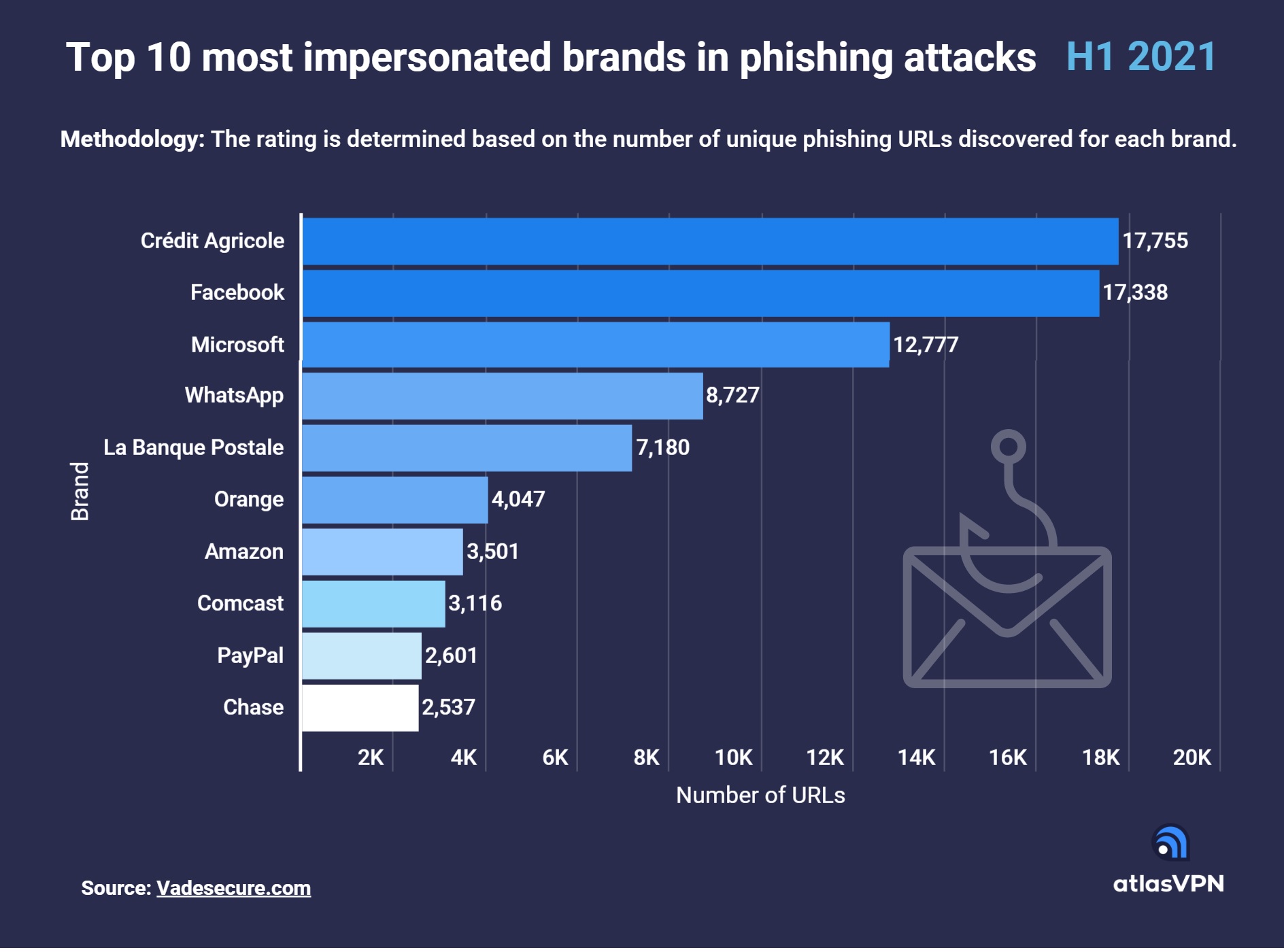
According to the data presented by the Atlas VPN team, Crédit Agricole, a French financial group, was by far the most used brand in phishing attacks in H1 2021. The brand was linked with 17,755 unique phishing URLs, followed by social media giant Facebook with 17,338 and Microsoft with 12,777.
The figures are based on Phisher’s Favorite Top 25 H1 2021 report by Vade, which looks at the 25 most impersonated brands in phishing attacks a few years ago from January 1, 2021, to June 30, 2021.
Multi-platform messaging service provider WhatsApp is the second social media brand to make the top ten list. It was taken advantage of in 8,727 phishing attacks. Meanwhile, French bank La Banque Postale occupies the fifth spot with 7,180 attacks.
Other brands in the top ten list include multinational telecoms company Orange (4,047), the world’s largest online retailer Amazon (3,501), multibillion-dollar media, entertainment, and communications company Comcast (3,116), digital payment service provider PayPal (2,601), and American national bank Chase (2,537).
Most phishing assaults were perpetrated in Brazil, followed by Russia and Indonesia.
Financial brands were criminals’ favorite
Generally, cybercriminals choose highly-trusted brands in their phishing campaigns. However, brands in certain industries were more favored than others.
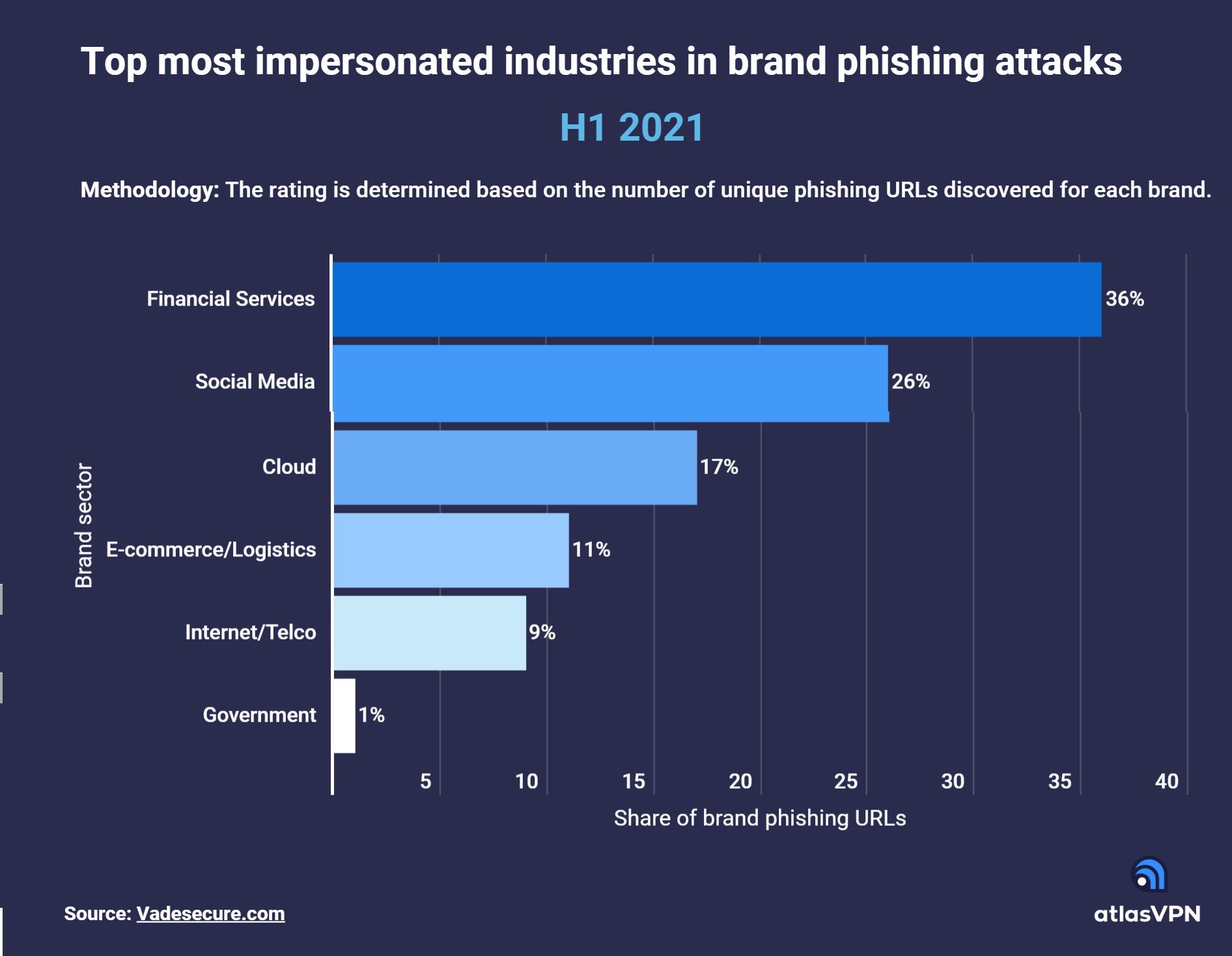
Financial service brands were particularly popular in phishing attempts due to the rise in digital payments and growing reliance on online banking during the pandemic. They accounted for 36% of URL phishing attacks in H1 2021.
Cybercriminals spoofed well-known financial brands such as Crédit Agricole, La Banque Postale, PayPal, Chase, Wells Fargo, Square, HSBC, and Banque Populaire to lure out sensitive information from unsuspecting victims.
Social media companies were also heavily impacted. Social media brand impersonation accounted for over a quarter (26%) of all brand phishing attacks in the first half of this year. Apart from Facebook and WhatsApp, Instagram and LinkedIn were common choices for criminals.
Next up is the cloud sector. Cloud companies like Microsoft, Netflix, Adobe, and DocuSign were involved in 17% of URL phishing attacks. Meanwhile, 11% of phishing assaults targeted e-commerce and logistics companies, such as Amazon, DHL, Rakuten, Apple, and eBay.
The remaining 10% of brands spoofed in URL phishing attacks were internet and telecommunication companies, such as Orange, Comcast, Yahoo, SFR (9%), as well as government organizations (1%).
Tips to avoid phishing scams
Keep your browser up to date. Look out for browser updates. They are released regularly and may contain security patches for vulnerabilities that were discovered on the browser. Cybercriminals often launch attacks to exploit known security vulnerabilities. Therefore it is essential to install any browser updates as soon as they become available.
Inspect the website’s URL. Carefully inspect the website’s URL before taking any action. Criminals use visually similar characters such as lower case “L” and capital “I” to deceive people into thinking they are on a legitimate website.
Look for an SSL certificate. Make sure the portal address starts with HTTPS (not with HTTP) and has a green padlock symbol before the web address. This means that the website has an SSL certificate, and the connection is encrypted.
Beware of grammar mistakes. Scammers rarely hire professional writers to check their copy-cat website’s content for errors. If a website is riddled with spelling mistakes, there is a high chance it is not legitimate.
Check if the website has been flagged. You can use URL checkers to see if the website has already been flagged. You can find many tools for this purpose by searching “Check URL safety” in Google.
Use Tracker Blocker. Take advantage of the Atlas VPN Tracker Blocker tool, which stops third-party trackers and blocks malicious websites for a safer browsing experience.